Five specialist workspaces organize offer, funnel, content, advertising, and sales work around Hamza's brand and commercial context.
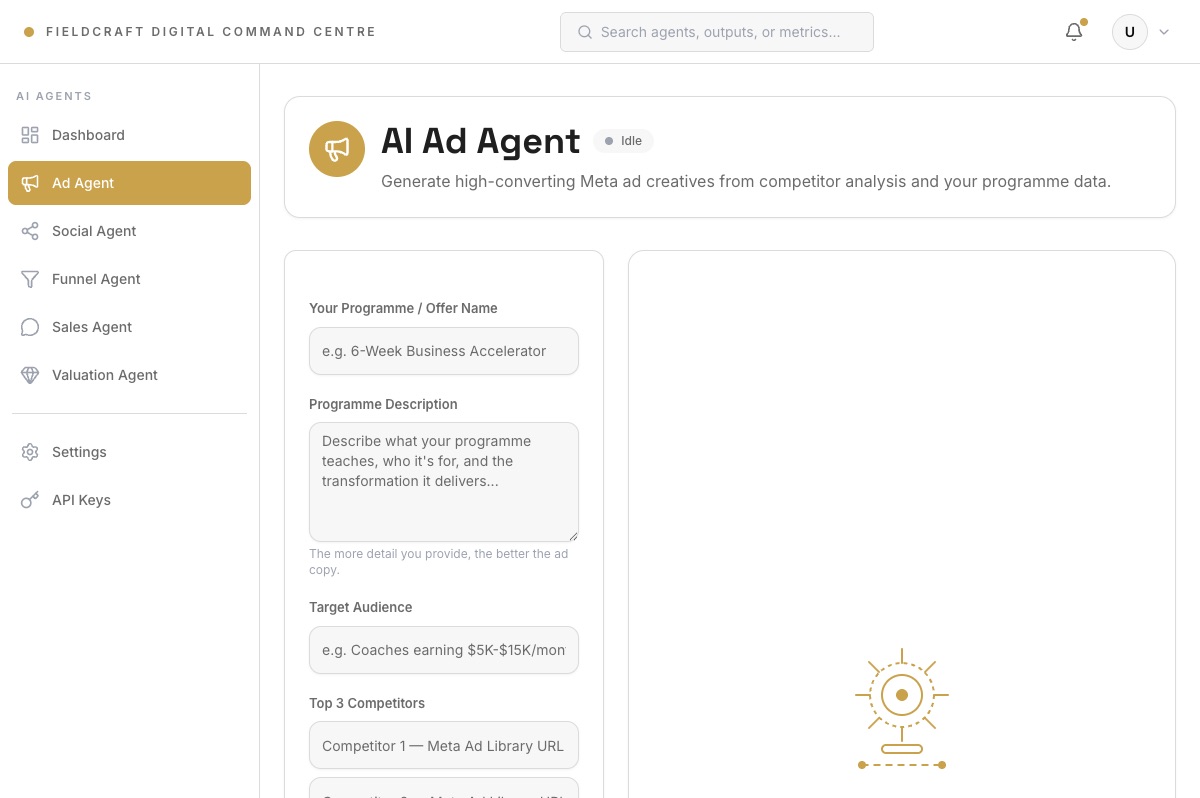
A real Ad Agent workspace capture from the command-centre build. Projected performance outputs are excluded.Verified interface
At a glance.
Operating layer
Revenue Systems
User
Hamza Chitalwalla
System boundary
Five specialist workspaces
Current status
Working build / performance unverified
Evidence type
Source and safe product capture
The operating problem.
Offer design, funnel production, content, advertising, and sales work can become five separate prompting habits with the same context repeated each time.
The operating change is a shared command surface where each specialist owns a clear job, exposes progress and outputs, and preserves run history for review.
Before
Repeated briefing and disconnected growth tasks
Brand, offer, audience, proof, and prior decisions are re-entered across separate tools.
After
Five accountable workspaces in one application
Each specialist has structured inputs, visible processing, role-specific outputs, and history.
The campaign handoff model.
This is the designed operating model. The current build provides specialist workspaces and shared visibility; automated handoffs between them are not yet verified.
Operating model
Source materialCoach, audience, proof
Valuation AgentOffer brief
Funnel AgentMap, page, VSL
Content & Social AgentIdeas and schedule
Ad AgentHooks and test plan
Sales AgentLead and call context
Human reviewCampaign decisions
Shared contextLearnings returned
The next layer should make each handoff explicit: approve and send, request revision, save without handoff, or stop the workflow.
Five specialist workspaces.
The public Content & Social label describes the implemented workspace named Social Agent.
Valuation Agent
Extract knowledge IP and turn source material into offer architecture.
Upload or paste course, presentation, transcript, or community material
Review extraction progress, knowledge map, IP nuggets, offers, and roadmap
Funnel Agent
Turn an approved offer into funnel structure and usable page assets.
Define the offer, audience, promise, price, method, proof, and funnel type
Review the map, sales copy, full-funnel copy, VSL, and page-builder output
Content & Social Agent
Translate the offer and campaign into platform-specific organic content.
Define brand, niche, competitors, goal, platforms, formats, and frequency
Review analysis, ideas, scripts, carousels, and content schedule
Ad Agent
Turn the approved offer and angles into advertising concepts.
Define programme, audience, competitors, niche, tone, CTA, and spend context
Review competitor analysis, hooks, copy variants, concepts, and test plan
Sales Agent
Keep lead context, outreach preparation, bookings, reminders, and call review together.
Search and inspect leads, form context, and prepared outreach
Review bookings, reminder settings, and call-analysis feedback
The designed review and approval sequence.
These states and human approval gates describe the operating model. Cross-specialist handoffs and consequential live actions are not verified.
Start at campaign level or open one specialistChoose the complete growth workflow or the specific job that needs attention.
Load shared operating contextCoach, audience, offer, voice, proof, constraints, and prior decisions are visible once.
Review the proposed workConfirm the specialist, inputs, outputs, and whether a later action needs approval.
Watch plain-language progressQueued, running, waiting, review, completed, and failed states explain what is happening.
Inspect the artifactReview inputs, version, evidence state, and the next specialist that could consume it.
Resolve critique or exceptionsEdit, request revision, rerun, or stop without hiding the failed state.
Approve the handoffChoose approve and send, save without handoff, request revision, or stop.
Return to the recordReopen prior artifacts, versions, activity, and campaign decisions without rebuilding context from chat.
What was customized for Hamza.
Audience and brand
The workspaces use Hamza's coach-specific voice, offer context, audience, and Indian commercial conventions.
Specialist inputs
Each workspace asks for the fields needed by its job instead of relying on one undifferentiated prompt.
Role-specific outputs
Offer maps, funnels, scripts, carousels, hooks, concepts, lead context, and call feedback have distinct review surfaces.
Honest action boundary
Draft and demo states remain separate from publishing, sending, booking, or spending through live integrations.
Evidence gallery.
The safe capture proves a real specialist workspace. The operating-model diagram is explicitly labelled as the designed next layer.
Structured programme, audience, and competitor inputs beside the Ad Agent output area.Existing product capture
What Fieldcraft delivered.
Operating design
Five accountable roles, their required inputs, processing states, review surfaces, and action boundaries.
Application system
Shared shell, specialist routes, API contracts, validated backend routes, run state, history, and demo-versus-live behavior.
Proof boundary.
Verified
Five specialist workspaces share one application shell.
Structured inputs, progress, outputs, actions, and per-agent history are implemented.
The backend includes validated routes and a persistent run store.
Not claimed
Automated cross-agent handoffs are not verified.
Source metrics, predictions, reach, revenue, bookings, and conversion are not performance evidence.
No claim is made that external messages, calls, ads, or posts were sent.
 Fieldcraft